The Problem:-I can't get into add/remove programs, when I click on the icon, nothing happens.
Cause:-This problem may happen if Appwiz.cpl is no longer registered.
Resolution:-To resolve the problem one has to re-register Appwiz.cpl
Start>Run>regsvr32 appwiz.cpl>ok
This will bring a pop up "DllRegisterserver in appwiz.cpl succeeded" , click Ok.
Sunday, November 27, 2005

Thursday, November 24, 2005
Annoying empty "Custom" folder on Desktop
The Problem:- When booting my XP pro pc, I boot to a desktop that contains an empty and inactive "Custom" folder. I can close it and proceed, but it is agrivating.
Cause:- This can be caused by leftovers from cleaning up spyware.
Resolution:-
Open Control Panel>Folder Options> View tab, uncheck the line "restore
previous folder windows at logon". Click apply/ok.
Start>Tun>msconfig>ok. On the general tab select the diagnostic mode. Click
apply/ok and reboot at prompted.
The folder should not show up now. Rerun msconfig, put the system back in
normal mode. Click apply/ok and reboot once more.
To remove the entires from the registry,see:-
'How to remove Startup items from the Source'
http://hive.net/Member/forums/9283/ShowPost.aspx
Cause:- This can be caused by leftovers from cleaning up spyware.
Resolution:-
Open Control Panel>Folder Options> View tab, uncheck the line "restore
previous folder windows at logon". Click apply/ok.
Start>Tun>msconfig>ok. On the general tab select the diagnostic mode. Click
apply/ok and reboot at prompted.
The folder should not show up now. Rerun msconfig, put the system back in
normal mode. Click apply/ok and reboot once more.
To remove the entires from the registry,see:-
'How to remove Startup items from the Source'
http://hive.net/Member/forums/9283/ShowPost.aspx
Tuesday, November 22, 2005
Blank Device Manager
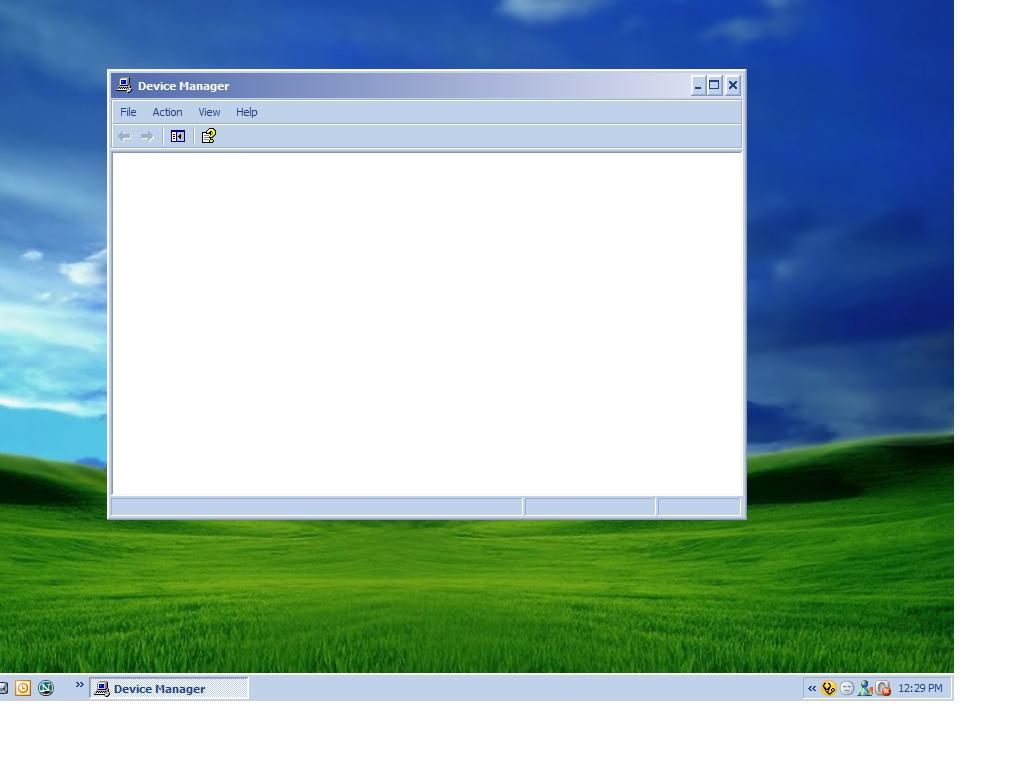
The Problem:-When you open device manager,you get nothing.It's totally blank.
Cause:-If Plug and Play service is either off or disabled then it may happen.Plug and Play Service enables a computer to recognize and adapt to hardware changes with little or no user input. Stopping or disabling this service will result in system instability.
Resolution:-
Start>Run>Services.msc>ok
Scroll down to Plug and Play service>Double Click on it>Make the StartUp type -Automatic>Click Ok/Apply.>Now reboot the system.
Further Reference:-
No Items Appear in the Device Manager List When You Open It
http://support.microsoft.com/default.aspx?scid=kb;en-us;311504
Subscribe to:
Posts (Atom)