Saturday, July 16, 2005

How to disable Security Alert icon reminders popping up


Overview:-Security Center alerts users to protect their computers against a variety of security risks.The Security icon pops up in the system tray and reminds us regularly about security related vulnerabilities. e.g. the anti-virus software has not been updated or the firewall is not configured properly,or the automatic update is not on or not configured properly.But if one wants to get rid of this icon and constant reminders he/she can do the following:-

Resolution:-
Start>Run>Regedit>Ok
Now navigate to the following key:-
HKEY_LOCAL_MACHINE\SOFTWARE\Microsoft\Security Center
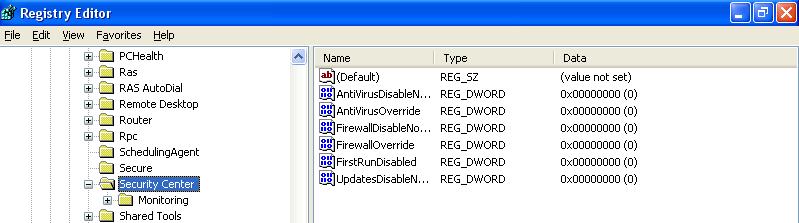
Highlight Security Center and you will find the following entries as default (the default value data is zero):- Click the following image to get an enlarge view:-
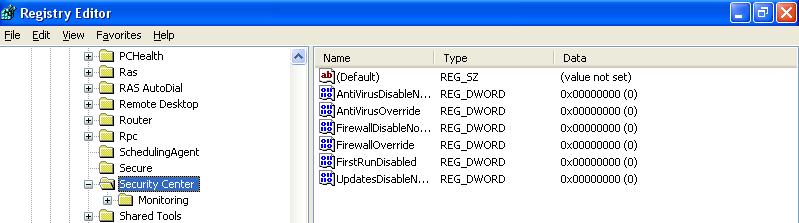
Now right click on each item and select 'Modify' Change the value Change the Value Data from zero to one.Close the registry editor and restart the computer.

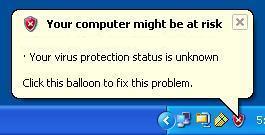
Security Icon sometimes missing in taskbar

The Problem:- The Windows Security Icon does not always show up when I start up my PC.Is this a problem?

Resolution:-No.just that there is nothing it needs to warn you about.The Security icon is only displayed if there is a problem with one of the items it's monitoring, ie firewall, AV or automatic updates.

Tuesday, June 28, 2005

64 Bit System Registry

The registry in 64-bit versions includes both 32-bit and 64-bit keys.Both are under one umbrella.You can view or edit both 64-bit and 32-bit registry keys and values by using the default 64-bit version of Registry Editor.

Where the 32-bit keys are displayed :-

They are displayed here:-HKEY_LOCAL_MACHINE\Software\WOW6432Node

How to open the 32-bit version of Registry :-
Start >Run>In the Open box, type %systemroot%\syswow64\regedit, and then click OK.

What will you do before opening 32/64 Bit registry version?
Before opening 32 Bit registry you must close the 64 Bit registry and vice-versa.

Role of -m Switch:-

but using -m switch one can start the 32 bit version registry. For example, if the 64-bit version of Registry Editor is already running, type %systemroot%\syswow64\regedit -m in step 2 to start the 32-bit version of Registry Editor.

Reference:-How to View the System Registry By Using 64-Bit Versions of Windows
http://support.microsoft.com/kb/305097/